One Account, Your Whole School
It is 8:40 in the morning and you have three kids waiting. One needs a grade-two reading lesson, one is halfway through a fifth-grade coding unit, and the middle one is somewhere in fractions and history and whatever else you scheduled last night. You are the teacher, the scheduler, the record keeper, and the person who remembers which platform tracks what. If you homeschool multiple kids, the answer to all of it is one account that holds every child's whole school, so you get to steer the family instead of running the operations department.
A family account is a single AI Home Academy login that holds a separate learner profile for each child, and each profile is its own complete school with its own courses, teacher, progress, and records.
That is the real weight most homeschool parents carry. Not the teaching itself, but the logistics stacked on top of it. Three kids at three levels across half a dozen subjects turns into a pile of logins, a browser with fourteen tabs, and a mental spreadsheet you can never fully put down. None of that means you did anything wrong. The tools scatter your family across a dozen places and make you the glue, and that is a load nobody should have to carry alone.
I run a homeschool household myself, so this mess is not theoretical to me. One kid is a full-time job. Two or three, each on their own path, and a caring parent quietly gets turned into an operations manager for a school of three. That is the part I wanted to take off your plate.
Why is homeschooling multiple kids so overwhelming?
Homeschooling multiple kids gets heavy because every tool you add multiplies the overhead instead of sharing it. One kid's curriculum lives on one platform and their sibling's lives on another, with different feature sets and different navigation. One shows gaps on a report screen; the other buries them three menus deep in a parent portal. Each tool tracks progress its own way, so nothing talks to anything. You end up being the integration layer, holding the whole picture in your head because no single screen holds it for you.
Here is the quiet cost of that setup, and to be clear, none of it is on you. The more your kids differ, the more places you have to check. You cannot see all three at a glance, so you find out someone stalled a week too late. The record keeping alone, credits and grades and what got finished, becomes its own unpaid job you do at night. That is friction the tools created, and it scales up with every kid you add.
How does one account run every kid at once?
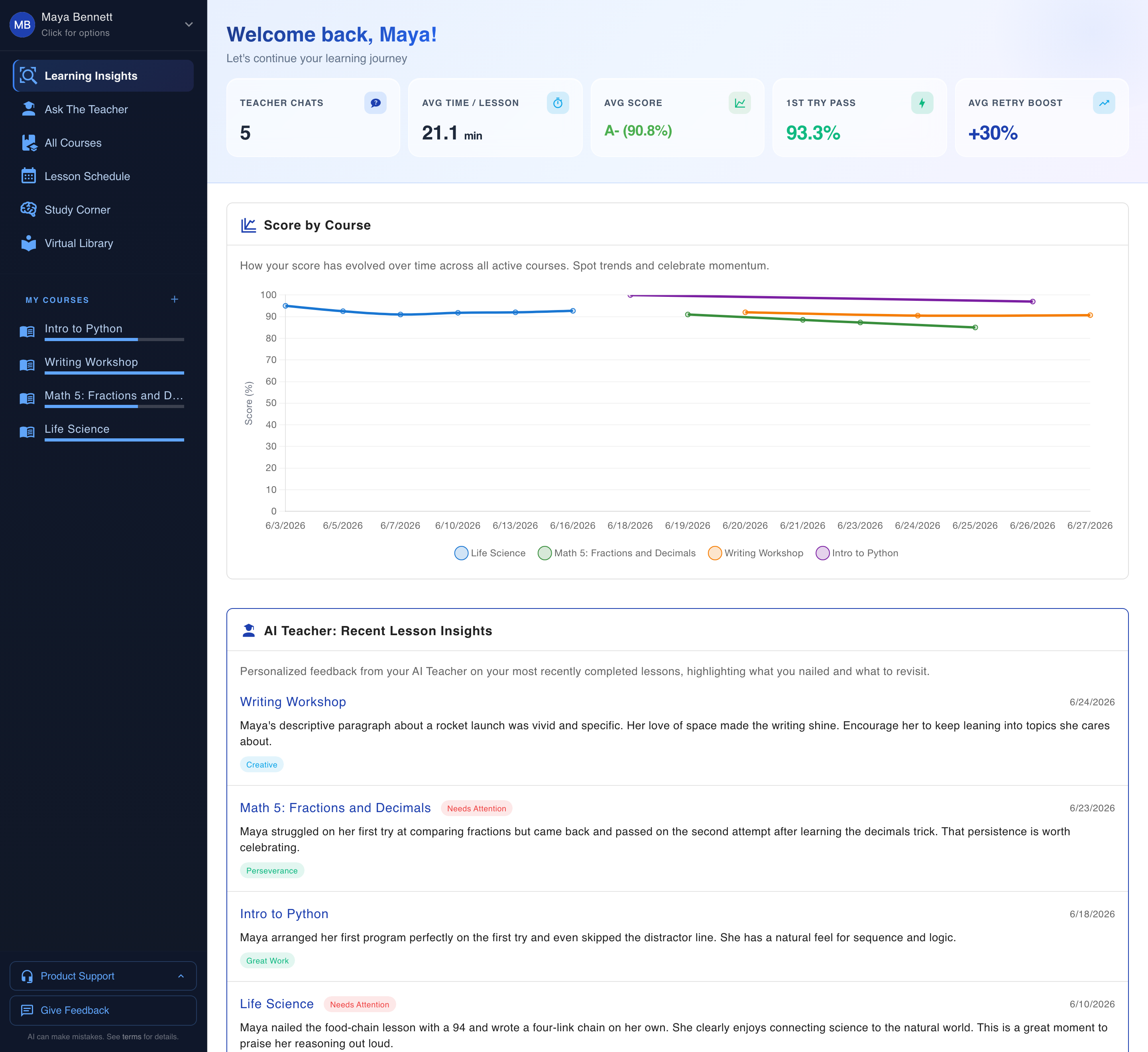
One account runs every kid at once by giving each child a separate profile, and each profile is a complete, independent school. Its own courses, its own progress and scores, its own AI teacher that remembers that specific kid, its own insights dashboard, its own records. You switch between children from one place. No separate logins, no separate subscriptions, no shuffling between accounts to see where everyone stands.
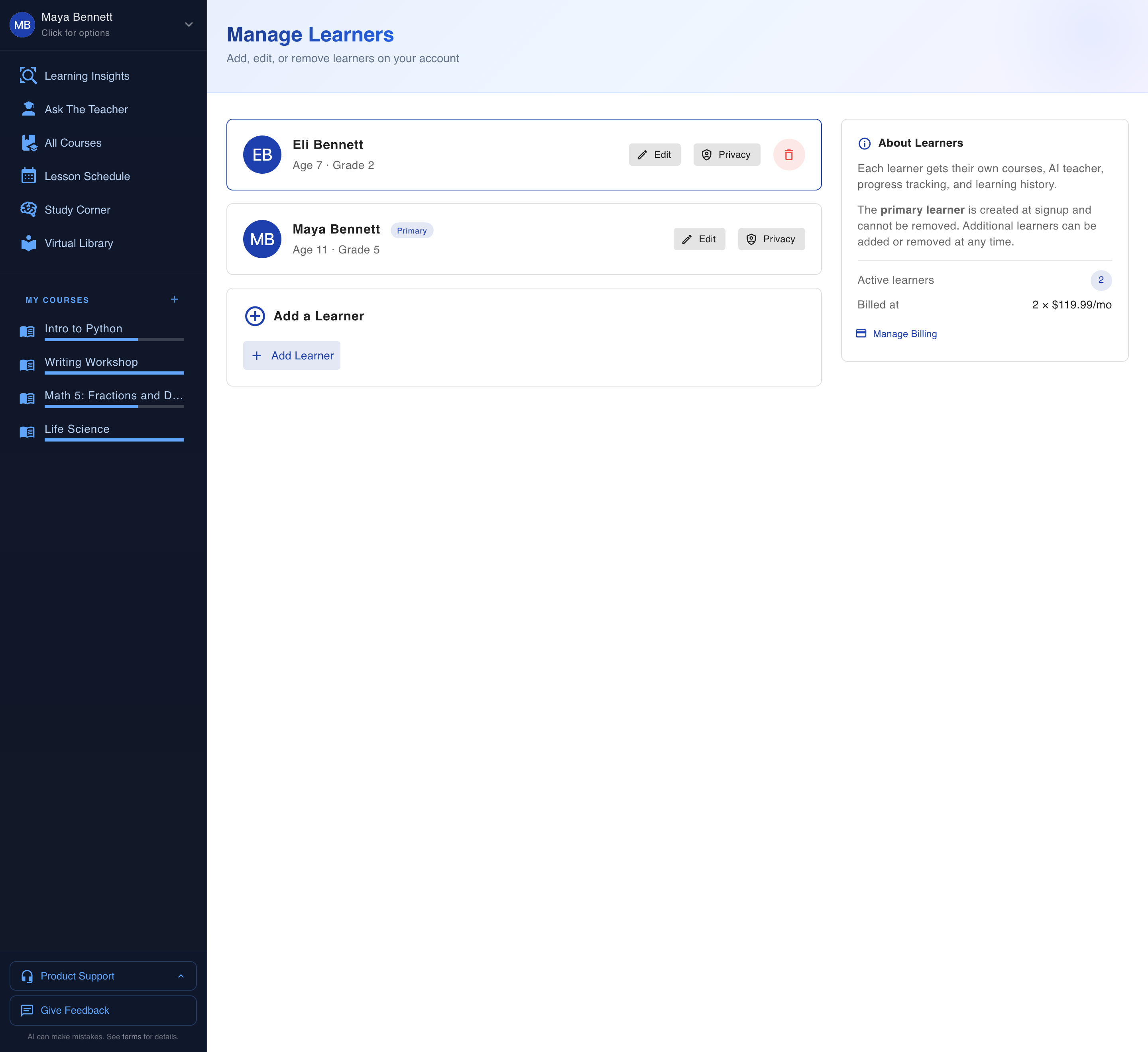
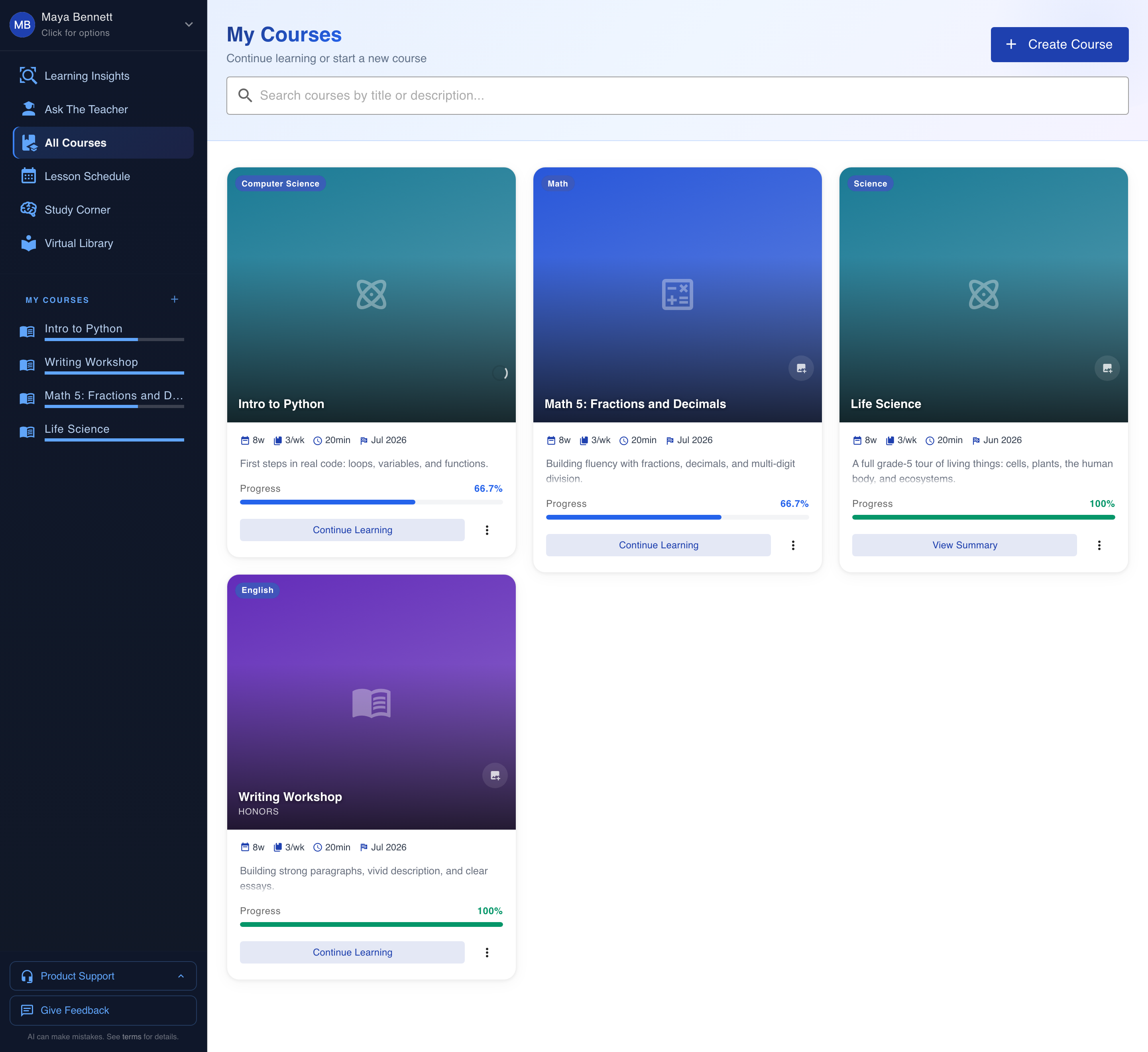
Look at what that actually means in a real house. Your second grader sounding out short vowels and your fifth grader debugging their first program are both live under the same login, and neither one borrows from the other. There is no shared content pool where a younger kid trips over an older kid's material. Each course is built for the specific child and the specific grade. A grade-two reader and a grade-five coder run side by side, fully separate, both a click apart from you.
The teacher travels with the child, not the account. Each kid's AI teacher keeps its own memory of how that child learns, what they got stuck on, and what finally clicked. Your careful, methodical one and your fast, distractible one are not sharing a teacher who splits the difference. Each gets one that knows them. If you want the full breakdown of the teacher personas and how each kid gets matched, we wrote it up in six AI teacher personas matched to your child.
How does one account handle different grade levels?
You homeschool multiple grade levels at once by giving each child a full, private school of their own inside the shared account. Their courses across any subject and any grade. Their progress, scored on their real work. Their teacher with its own memory. Their insights dashboard showing where they are strong and where they slipped. And their own records, building quietly as they go. Nothing pools. Nothing averages. Siblings never blur into one number.
This is where a single account beats a stack of tools that never learned to talk. When each kid's progress lives in its own place and updates on its own work, you get a true read on each child instead of a family blur. One dashboard tells you your fifth grader is cruising in math and drifting in writing. Another tells you your second grader finally cracked blends this week. Two kids, two honest pictures, both a tap away. For how those dashboards go past a completion checkmark into real signal, see what real homeschool insights look like.
The independence matters most when your kids are nothing alike. A twice-exceptional kid reading years ahead in one subject and stuck in another needs a plan built for exactly that split. Their sibling needs something else entirely. Because every course, teacher, and record is per child, the platform hands each one the right school on the same morning. Nobody gets measured against anybody. For how a single kid's whole experience bends to who they are, read homeschool that bends to your actual kid.
How do homeschool transcripts and records work for multiple kids?
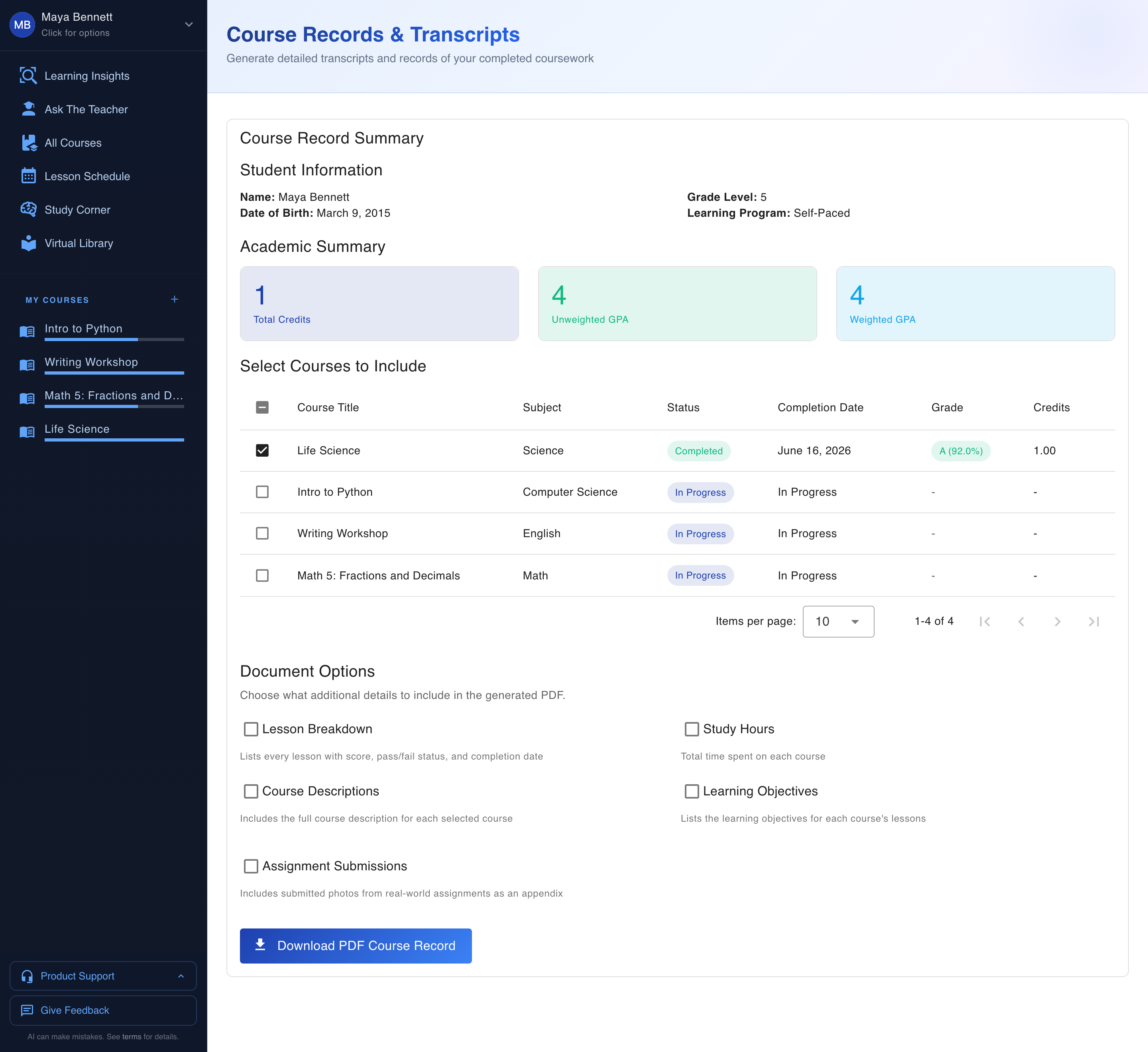
Each child gets a real transcript and records built as they go, in their own separate file. Credits, GPA, and grades generate automatically off the work your kid completes, per child, no shared pile. You are not reconstructing a year of learning from memory in April. The record fills itself in while the learning happens, so the part most parents lose sleep over is handled before you ever think to worry about it.
This is the job that usually falls on the parent at the worst possible time. Report season, transcript requests, the annual scramble to prove a year of real school actually happened. With records generated per child as they learn, that scramble mostly disappears. Your second grader and your high schooler each have their own record accumulating in real time. When you need it, it is already there, in their name, tied to real completed work.
| Juggling a stack of tools | One account, one pane of glass |
|---|---|
| A separate login and subscription per child | Every kid under one account, one plan |
| Progress scattered across a dozen programs | Each child's progress in its own dashboard |
| One shared or generic teacher | A per-child AI teacher that remembers that kid |
| Records rebuilt from memory at year end | Transcript, credits, and GPA generated as they go |
| You are the integration layer | The platform holds the whole family for you |
Is one homeschool account easier than juggling separate tools?
Yes, because one account stops you from being the bottleneck. When the courses, teachers, progress, and records all live in one place and run themselves per child, your job shifts from doing the logistics to steering the ship. You glance at three dashboards, see who needs you today, and spend your morning teaching the one kid who is stuck instead of chasing paperwork for all three. That is the whole point.
Think about where your hours go right now. Setup, tracking, switching tools, remembering, recording. Almost none of that is teaching. It is operations work you took on because nothing connects. Pull all of it into one account, and the operations mostly run themselves. What is left is the part only you can do, which is knowing your kid and showing up for the moment they need a person. That trade, less clerk and more teacher, is the reason a family platform is worth having at all.
That is the contrast with the usual homeschool tech stack. Other setups hand you a pile of disconnected tools and let you be the glue that holds them together. Here the whole family school is one pane of glass. You see everyone, each kid keeps their own real school, and the busywork that used to eat your evenings stops being your job.
Where to start with your own family
The honest version is simple. One account, every child included, each with their own courses, teacher, progress, and records, and you finally get to steer. The free trial runs on full Max tier, so every learner profile, every teacher, the full insights and records are all live from day one, for every kid you add. There is no per-child upsell waiting behind the trial.
Start by adding your kids. Set up a profile for each one, the way you would describe them to a tutor who actually cared, and let each child's school build under the same roof. Run a morning where you check three dashboards instead of three logins. The first time you see your whole family's school on one screen, with each kid in their own real space, you will feel the weight you have been carrying finally set down.