Completion Isn't Comprehension
It's Sunday night. The kids are asleep, the week's lessons are logged, and the app is showing you a tidy row of green checkmarks. And under the satisfaction sits one quiet question that never fully goes away: is any of this sticking? The screen says one hundred percent complete. It says nothing about whether the fractions landed.
That question haunted me before I ever wrote a line of this platform, so let me answer it straight. A completion checkmark tracks whether your child showed up, not what they understood. The two drift apart all the time, in every family, and the checkmark is built to hide the drift. Real homeschool learning insights measure understanding instead, concept by concept. A learning insights dashboard is the screen that shows what your child has mastered and what they are still shaky on, one concept at a time, in place of a single completion percentage.
Most apps hand you a gold star. A real dashboard names the two or three concepts your kid is wobbling on, then hands you the fix. Everything in this post lives in the space between "finished" and "understood."
Does "100% complete" mean my child understood it?
No. A completion percentage means your child finished the activity. They sat down, clicked through, and reached the end. That counts for something, and on the hard weeks it counts for a lot. But it measures effort, and effort is a different substance from comprehension. A child can complete every lesson on fractions and still have no idea how to convert an improper one.
A percentage complete, a streak, a progress bar. All three measure the same thing: time in the seat.
Here is where the checkmark quietly works against you. When effort and comprehension drift apart, green is what the drift looks like. You get a full bar and a good feeling, and the shaky concept sits underneath it, waiting for the next unit that depends on it. No parent can see through that, because there is nothing to see. Gaps are invisible by nature, and a checkmark was never built to surface them.
What should homeschool progress tracking show you?
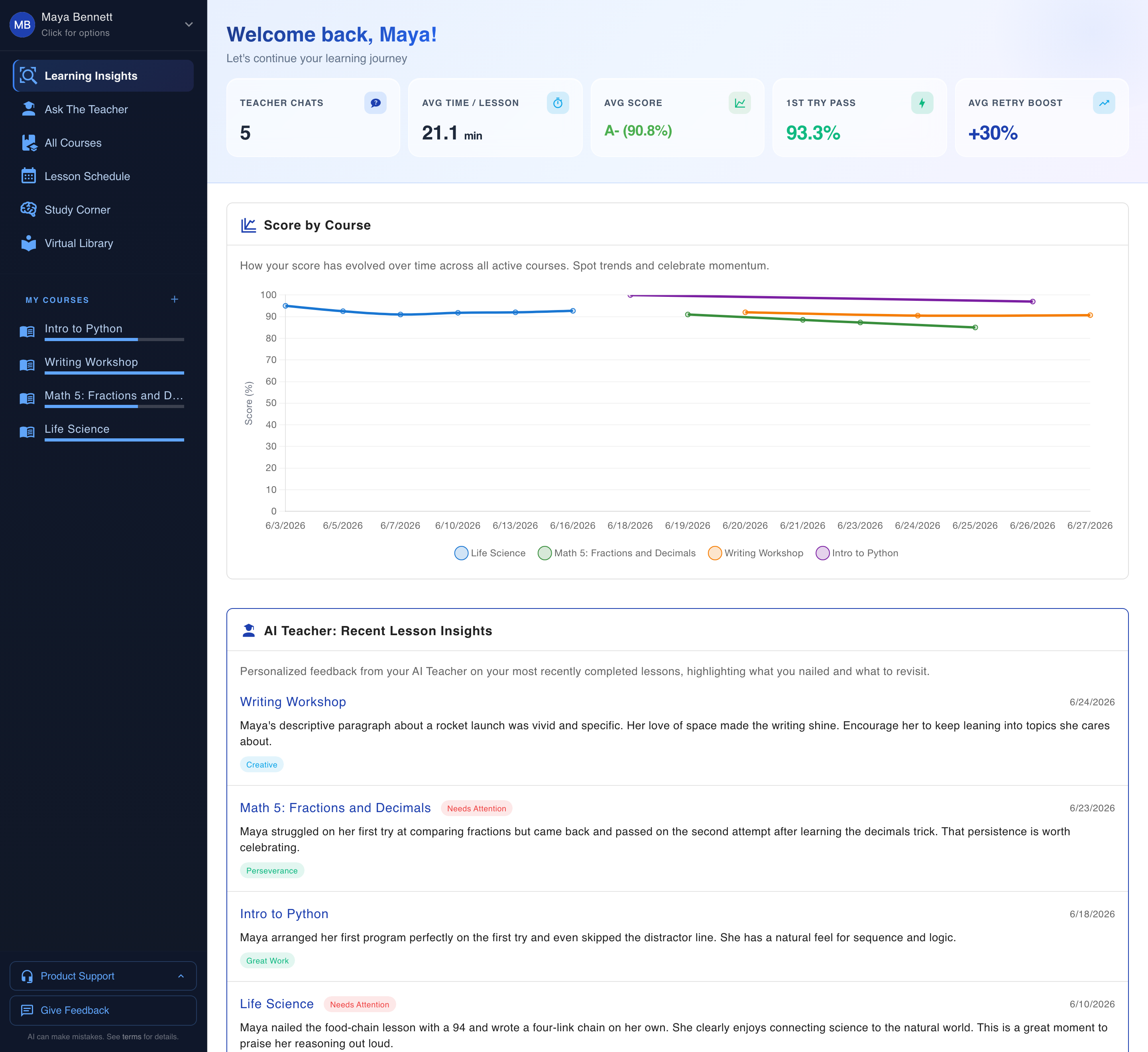
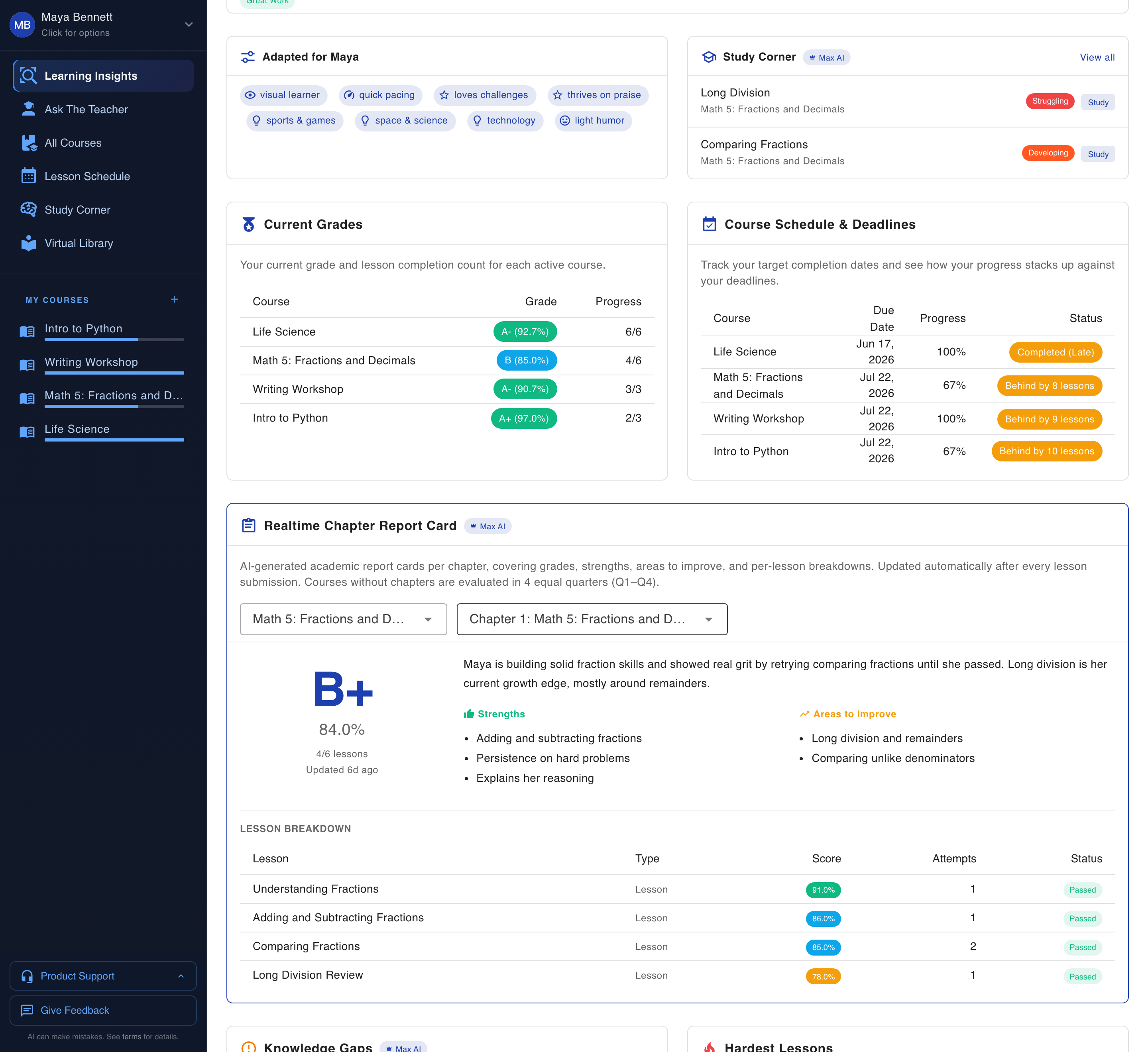
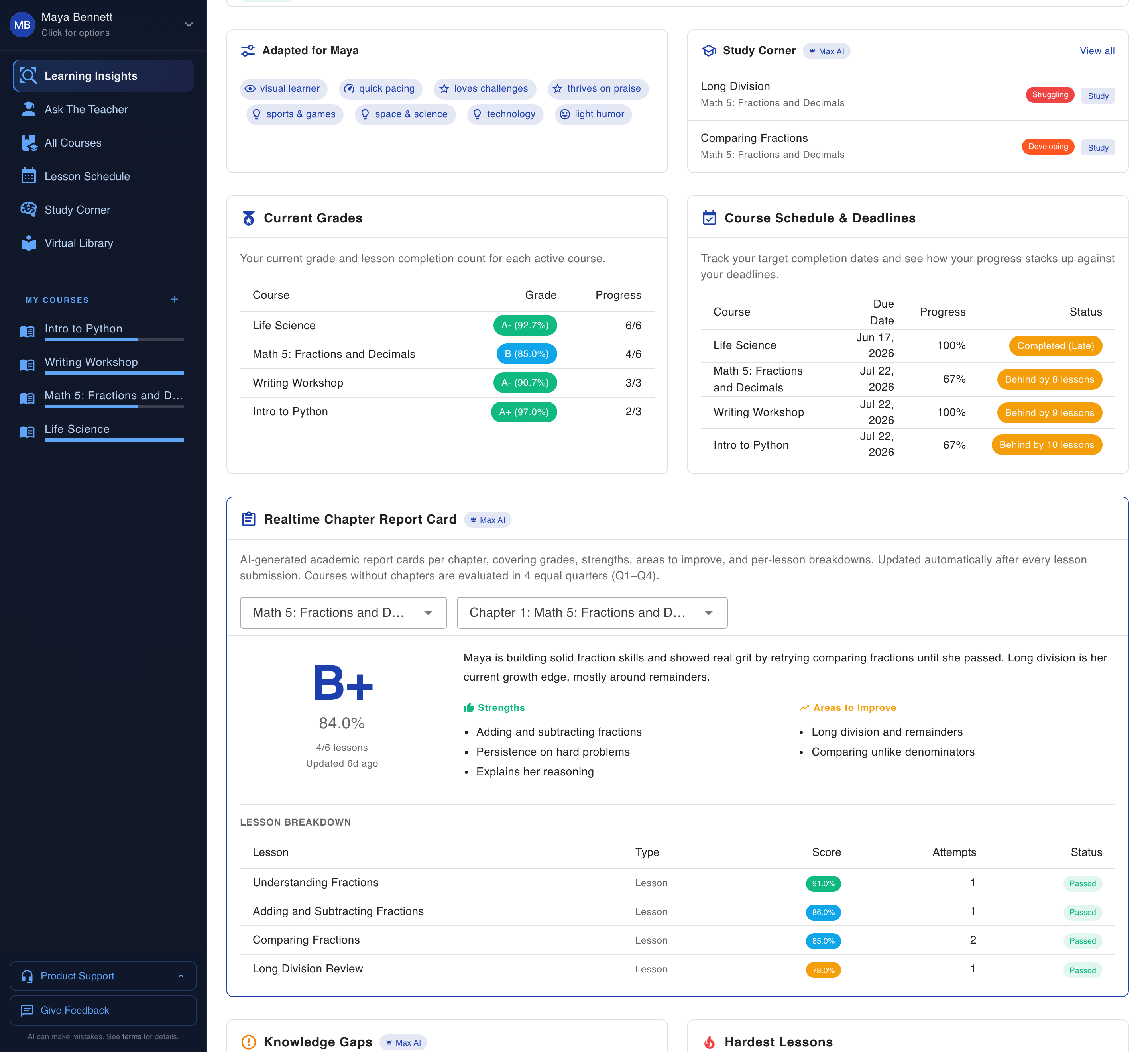
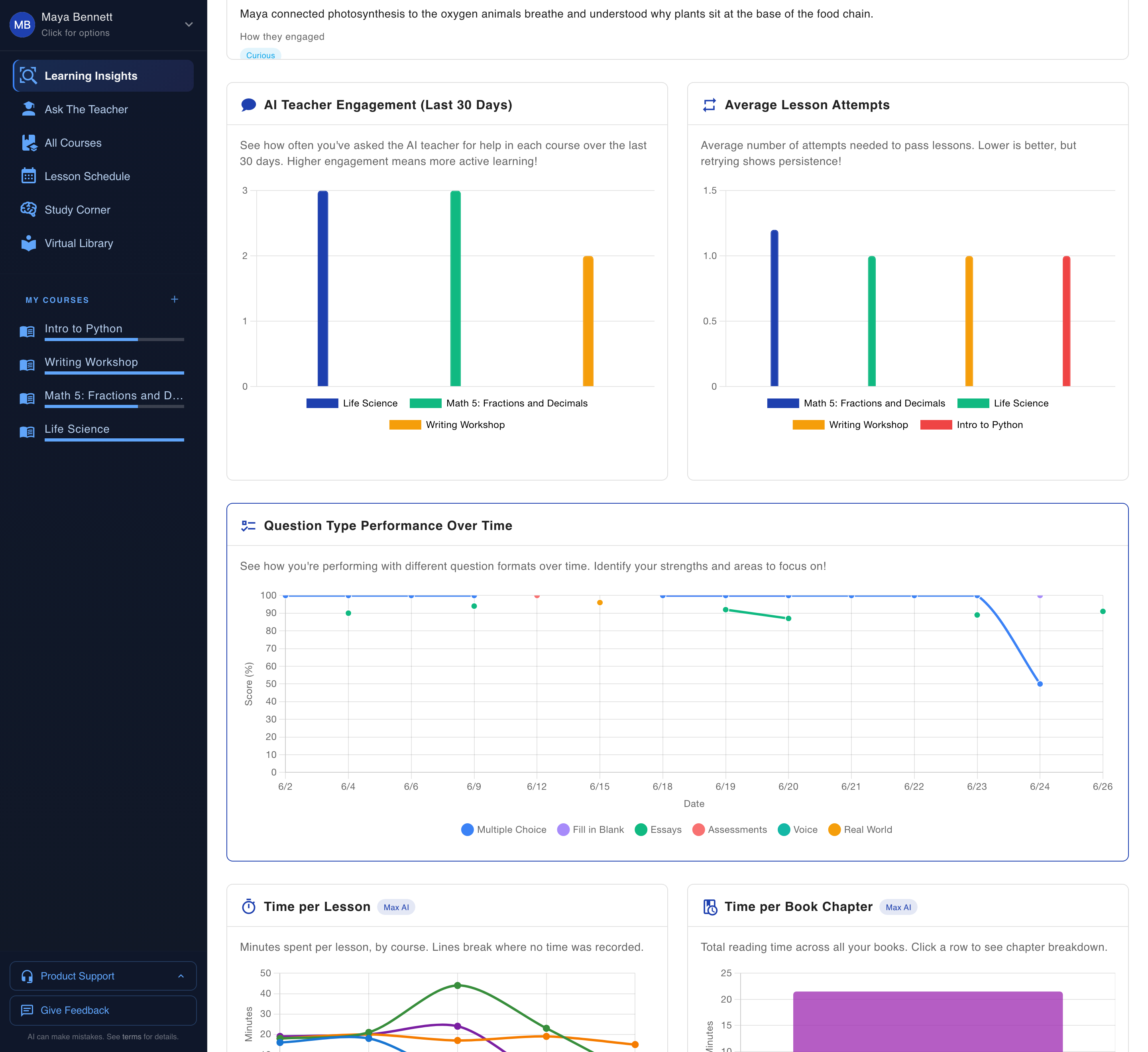
Understanding, with the evidence attached. For every concept your child has touched, you want to see how accurately they answered, whether they got it on the first try, and which lessons gave them the most trouble. AI Home Academy tracks per-concept accuracy across every lesson and writes a plain-English summary of what your child owns and where they wobble. That summary is the part a busy parent reads first.
The dashboard surfaces the hardest lessons on its own, so you are never scrolling fifty green rows hunting for the one that went sideways. First-pass rate sits right next to accuracy, because a kid who gets there eventually and a kid who nails it cold are two different kids, and you teach them differently.
Each insight card carries a priority chip, which is the app telling you where to spend your limited teaching hour today. A ranked, short list of what matters most this week, written in a sentence you can read in five seconds between loads of laundry. The score-by-course chart sits beside it, so you can glance from the big picture down to the one thing that needs you.
Set the two approaches side by side and the difference stops being subtle.
| What most apps report | What AHA reports |
|---|---|
| Lesson complete | Per-concept accuracy across every lesson |
| A percentage score | First-pass rate, whether it landed the first time |
| A streak | The specific concepts your child is shaky on, named |
| A progress bar | The hardest lessons, surfaced for you |
| Nothing about the fix | A one-click path to close the gap |
Everything on the left is an effort signal. Everything on the right is an understanding signal. One tells you your kid was present. The other tells you what to do on Tuesday morning.
How does it name the exact concept your kid is shaky on?
By tracking accuracy at the concept level instead of the subject level. Most tools tell you "fractions" needs work, which is too broad to act on. AHA names it: "converting improper fractions." Each concept sits on a mastery ladder with four rungs, Struggling, Developing, Approaching, and Mastered, so you see how close your child is to owning the skill rather than a bare pass or fail.
If you are the spreadsheet parent in your house, the one who compares curricula for a living because someone has to, this next part is for you. The Knowledge Gaps view shows the raw evidence behind every rating. How many times your child met a concept. How many they got right, how many they missed, and which lessons those questions came from. A "Developing" rung traces straight back to the two lessons where the misses happened. There is no black box to take on faith, and I refused to ship one, because I would never trust a rating I couldn't audit either.
The encounter count matters more than people expect. One miss on a concept your child has seen twice is noise. The same accuracy across nine encounters is a signal you can plan around. Because every rating counts encounters and links to its source lessons, it earns its place instead of swinging on a single bad morning.
That specificity is the difference between a report you nod at and a report you can teach from. "Fractions are hard for her" is a shrug. "She has converting improper fractions at Developing, three right out of seven, mostly in last week's lessons" is a plan.
Why does catching the crack in October beat finding the canyon in March?
Because a small gap in October is a twenty-minute fix. The same gap ignored until March is a wall your child hits in every lesson built on top of it. AHA works like early warning. It flags a wobble the first week it appears, while closing it is still cheap, instead of at the end of the year when it has compounded into three units of confusion.
Math is the clearest case. Miss improper fractions in the fall, and by spring every mixed-number word problem feels impossible, and nobody can say why. The child concludes they are "bad at math." They are not. They have one unaddressed concept quietly poisoning everything downstream of it.
I learned this one at home, not in a spec document. My own daughter has ADHD, and her hard days and her strong days can look identical on a progress bar. The green row told me she showed up. It could not tell me which of those days the material stuck, and that difference is the entire job. Per-concept accuracy tracked over time is what finally showed it: a running record of first-pass rates that reveals the trend before it becomes a crisis.
The early catch is gentler on the kid, too. A gap caught in week one gets fixed in a short, low-stakes session while the material is still fresh. A gap caught in month six means backing up over a semester, which feels like punishment to a child and like failure to a parent. Neither of you deserves that. Small corrections, made often, keep the whole year calm.
What happens after the dashboard finds a gap?
It hands you the fix. Spotting a gap is half the job, and it is where most tools that even get that far stop cold. On the Max AI plan, your child can open a Study Corner session on that shaky concept, a targeted practice session built around exactly what they missed. One click from the insight to the remediation. No hunting for worksheets, no assembling a review unit from scratch at 9pm.
This is the part of the product I care about most. Reporting a gap and leaving you to solve it is a homework assignment for the parent. Detecting the gap and then closing it is an actual education product. Consider what the alternative asks of you: notice fractions look weak, go find practice problems, check they match the exact skill, sit your child down, hope you picked right. That is a research project stacked on top of teaching. AHA collapses the chain into a button, because it already knows the precise concept and can build the session around it. You stay in charge and skip the busywork.
If you want the mechanics, the Study Corner walkthrough breaks down how a Max AI plan session gets assembled from the exact concepts a child missed. And because the system remembers how your child learns, the fixes get sharper the longer it watches, instead of resetting to zero every lesson.
What to do with the next green checkmark
Enjoy it, then ask it the second question. A gold star is a nice feeling, and your kid earned it. What to teach next is a separate answer, and it is the one a completion bar cannot give you. Comprehension data can: concept by concept, with the evidence attached and the fix one click away. You get to stop guessing what your child knows and start seeing it.
The honest way to test this is on your own child's work, not my word for it. Start a free trial, which runs on the full Max tier, so the insight cards, the mastery ladder, the Knowledge Gaps view, and the Study Corner fixes are all live from day one. Give it one week of real lessons, then read the summary. It will tell you something the checkmark never could.